Decisions, spans and nested runs, in the record.
onetrace 0.5.0 and onetrace-verify 0.5.0 are on PyPI. A step that acts on an onedoor decision records the decision it cites and the permit it acted on, and the verifier checks that what ran was permitted. A step inside a span records its trace id, and a run started inside another run's step is recorded as that step's input, so a comparison descends into it. The record format stays 0.3, and a run that uses none of this writes the same bytes as before. onetrace-console 0.3.2 opens every comparison with one checked sentence on where the runs first differ, with the suggested explanation directly under it. The record stays what it was: one receipt per step, checked by a verifier that doesn't trust your code.
onetrace 0.5.0
What a step was allowed to do, where it ran, and what it called.
Three optional blocks in the receipt. A 0.4.0 verifier reads a 0.5.0 record unchanged, and a run that records none of them writes receipts byte-identical to 0.4.0.
Decisions, recorded with the step they gate
@ot.run(..., gated_stages=[...]) declares which steps must be gated. Inside such a step, ot.decision(ref, permit=None, action=None) records the onedoor decision it cites, the bound permit's compact JWS, and the action's digest. onetrace-verify 0.5.0 adds five rows for them, read with --decisions and --permit-issuers: every gated step cites a decision, each reference is well formed, a step that acted cites a permitting decision, the permit covers the recorded action, and the decision is in the export. onetrace never imports onedoor; the checks are vendored, standard-library code tested against onedoor's published vectors.
The span context
A step that runs inside an active OpenTelemetry span records that span's trace id and span id; the run's manifest records its traceparent, read from the active span or from the TRACEPARENT environment variable. No OpenTelemetry package is required. A malformed TRACEPARENT is refused and named, never recorded. The trace is a view; the record stays the evidence.
Nested runs
A step called while another runs records its parent, and the caller lists its children in call order. A run started inside another run's step records which run and step started it, and the outer step records the inner run as an input whose digest is the inner chain head. A call nested past 32 levels is refused and named. A comparison descends into a step's children and, with --nested-run, into a nested run, naming the first differing child: "inside plan, at price_lookup". onetrace-verify checks that each nested run's chain head is the one the outer step recorded.
pip install --upgrade "onetrace[crypto]"
onetrace-verify runs/<run> --decisions decisions.jsonl --permit-issuers permit-issuers.json
onetrace localize runs/a runs/b --nested-run runs/a-inner --nested-run runs/b-inner
The full list is in the package's changelog at the tag. The documentation pages on this site describe 0.4.0 and still apply; the three new pages are in the source package and at the tag.
onetrace-console 0.3.2
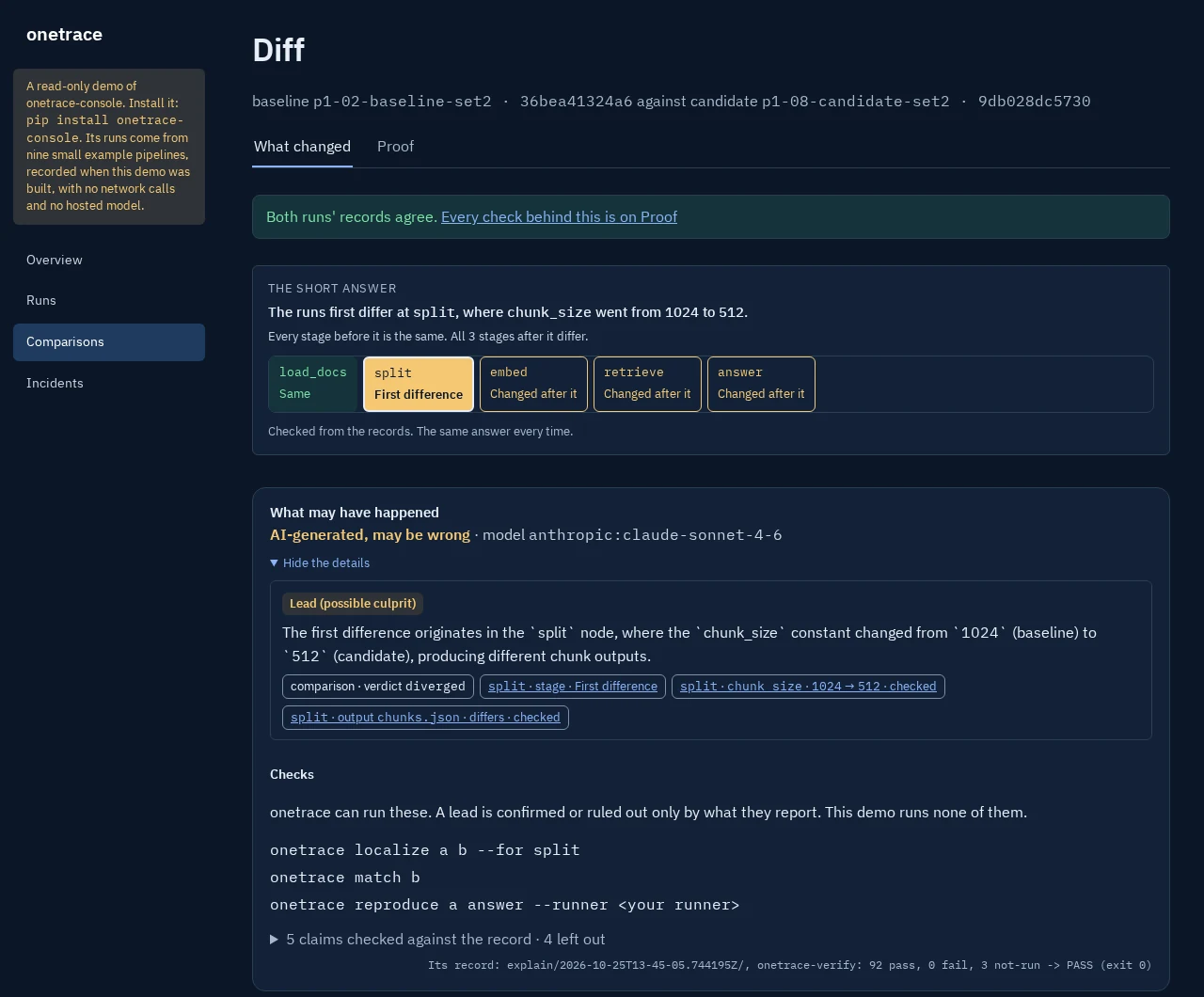
A short answer at the top of every comparison.
From the comparison's own records and no model, so it is the same every time. The sections below it are unchanged.
The short answer
One sentence says where the two runs first differ and what differs there: a setting by its recorded name with both values ("The runs first differ at split, where chunk_size went from 1024 to 512."), an input, a configuration, or the step's output. A line under it says the stages before it are the same and counts what came after. A strip shows each stage in order with its result, the first difference marked. Runs whose outputs all agree say so, and name a setting that differs anyway.
The explanation, redrawn and moved up
It sits directly under the short answer, with one heading, "What may have happened", and "AI-generated, may be wrong" with its model on every explanation. Each kept claim is a card: its kind, its text, and its cites as chips naming the stage and the item, with both values where the records hold them. Each suggested check is listed once; on your own console, the ones it can run get a Run button and every other a Copy button, and the live demo lists them as text. A footer counts the claims checked against the record and those left out. The kept explanations on the live demo are drawn in this layout from the same records.
A setup page for Explain
On your own console, /explain/setup is a guide in three steps, and changes nothing: the model your configuration names, an OpenAI-compatible model on your machine as a choice, what always stays with you and what is sent, the two flags that add text or hold a value back, and the three promises. It has no button, and never shows the key, its variable, the endpoint or the request. The live demo has no setup page.
pip install --upgrade onetrace-console
onetrace-console demo --open
The full list is in the release notes.
onetrace-console 0.3.1
A Compare button, a faster store, and two more pipelines.
Compare with one press
On your own console, each pair not compared yet has a Compare button beside its request. A Compare press, a drawing of the pages and the public build each read the store once; every page is the same, byte for byte, as before. On one Windows PC, measured side by side, a Compare press went from 73.8 s to 9.1 s and the public build from 796 s to 309 s.
Invoice match and wheel-bolt torque
Two more example pipelines in the demo: a supplier's invoice matched against its purchase order and goods receipt, with a price tolerance, to paying or holding it; and a tightening tool's five bolt torques against a window, to passing the wheel or sending it to rework. Both use invented example data. See the procurement and automotive pages.
Kept explanations on a public console
A public console runs no command and makes no network calls. It now shows the explanations its build kept, made once and served as files: on the comparison's page, each with its model, its claims with their cites, the checks it names, and the claims dropped with the reason. The live demo has shown four since, and every other comparison there says none is kept.
The full list is in the release notes.
onetrace-console 0.3.0
The console moves to onetrace 0.4.0.
It runs on onetrace 0.4.0 and onetrace-verify 0.4.0, and reads runs recorded in format 0.3 beside runs in the earlier formats, which read as before. Every verdict it shows is still the check's own.
A drift page for each pipeline
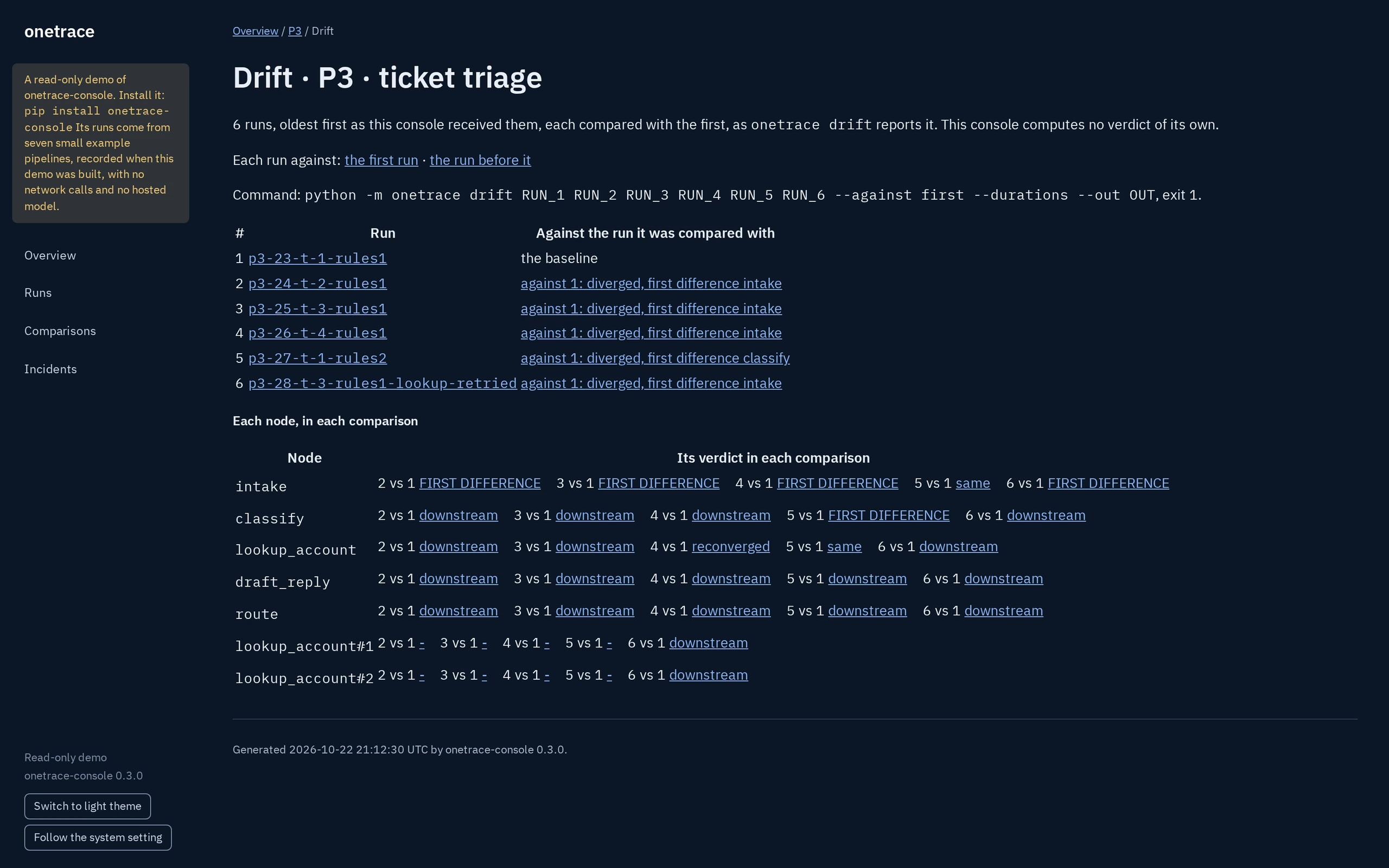
The console runs onetrace drift over a pipeline's stored runs, in the order it received them, and shows what it reports: each run against the run it was compared with, then each step's verdict, linked to that comparison, or to choosing it where none is held. It names the command and its exit, and computes no verdict of its own.
A suggested explanation, on the comparison page
Where onetrace-explain is installed, a comparison page has a Suggested explanation section below the verdicts. Explain is pressed per comparison, and each explanation is labelled AI-generated and may be wrong. Its claims link into the record, and the claims it dropped are counted, with the reason; their text is never shown. Before it first sends a kind of item to an endpoint, it names those kinds and waits for Send; "Show the packet" shows the exact bytes and sends nothing. The console does not depend on it.
What format 0.3 adds, in the check's words
Where a run leaves out stages it declares optional, holds a step back before it runs, or keeps no output files, the run's page quotes the check's own row for it. Where a run keeps no output files, the page says the check did not look at them, and does not say the records agree.
pip install --upgrade onetrace-console
onetrace-console demo --open
On Windows, Explain needs a store folder of 140 characters or fewer with long paths off, and 195 or fewer with them on. Where the folder is longer, the comparison's page says so in one line, and Explain does not run.
The full list is in the release notes.
In 0.4.0
Three new ways to read your runs.
Each one is a view of the record. None of them changes a verdict.
Send a run to your tracing tools
onetrace export otel RUN writes a run as one OpenTelemetry trace in OTLP/JSON: a span per step, linked where one step read another's output. The same run exports the same bytes. It makes no network calls and needs no OpenTelemetry package, and values, exception text and paths are never exported. The trace is a view; the record stays the evidence.
Many runs, side by side
onetrace drift compares a series of runs, each with the first run or with the one before, and every comparison is a diff of its own. Add --durations to see each step's time from its receipts, with a note on the steps that got slower. Timing is shown, never judged.
A suggested explanation, checked
onetrace-explain asks a model you configure where to look in a comparison, then checks every claim against the record. Claims that cite nothing, misquote the record or claim to know why something differs are dropped. Everything it shows is labelled AI-generated and may be wrong. More below.
pip install --upgrade onetrace
onetrace export otel runs/<run> --out trace.json
onetrace drift runs/run-1 runs/run-2 runs/run-3 --against first --durations
Also in 0.4.0
Records that say more, and pipelines that run in parallel.
Record format 0.3
A stage can be declared optional, and a run that skips it still reads complete. A step a plan held back before it ran keeps the link it attempted. A run can declare that it keeps no output files. An earlier verifier reads each of these the same way or more strictly, never more loosely.
Concurrent stages, named
ot.map (threads) and ot.gather (asyncio) run a stage over many items and name each call by its item, never by the order calls finished in. ot.pool and ot.carry carry the run into threads you start yourself.
Inside your framework
onetrace.langchain records messages and prompt values without their per-call ids. onetrace.langgraph records which node wrote each key of a graph's state, so a comparison can follow a value back to the node that wrote it.
onetrace-explain 0.1.0
A suggestion about a record, never a reading of it.
A separate package. onetrace, onetrace-verify and the console neither depend on it nor import it, and nothing they report changes with it.
You choose what's sent
It sends a fixed evidence packet to the model you configure: an OpenAI-compatible endpoint or the Anthropic Messages API. Your machine's paths, your environment and the model key are never in it. Kept text goes only with --include-text, and --dry-run shows the exact packet first.
Claims are checked before you see them
Every claim has to cite the record and quote it correctly. Claims that don't are dropped, without asking any model, and so is any claim to know why something differs. What it suggests next is a onetrace command you can run.
It leaves a record too
Each explanation is recorded as a onetrace run of its own, so you can check later what was sent and what came back.
A real explanation of the demo's split comparison, written by claude-sonnet-4-6 on the local console 0.3.0.
pip install onetrace-explain
onetrace localize runs/A runs/B --out report
onetrace-explain report --dry-run
In 0.3.1
Fewer false alarms, and comparisons that fit a pull request.
Follow the output you care about
onetrace localize A B --for <stage> starts from one output and walks back to where its change began.
Name the noise you expect
--mask FILE on diff and localize sets aside the differences you expect between releases, and every step a mask changes says so. onetrace mask suggest A B drafts a mask from two runs.
A summary for your pull request
onetrace summary prints a short Markdown summary of a comparison, and of the verifier's result, for a pull request comment. onetrace match finds the earlier runs that were called with the same inputs.
In 0.3.0
Gates for your CI.
onetrace-verify 0.3.0 added three opt-in gates. --require-signature fails a run with no valid signature. --require-trusted fails one not signed by a key you trust. --require-complete fails one whose declared stages didn't all run. The onetrace GitHub Action runs the verifier and the comparison on every pull request, and posts the summary there.
Upgrading
One command, and your old runs still verify.
pip install --upgrade onetrace onetrace-console
onetrace-verify comes with it and reads every earlier record. onetrace-console 0.3.2 runs on onetrace 0.4.0; the console release that runs on 0.5.0 follows, and until then an environment that holds the console keeps onetrace 0.4.0, while one without it takes 0.5.0.
The full list of changes is in the manual and in each package's changelog.
New to onetrace?
Start with two decorators on the code you already have, then compare two runs in your browser.