When your AI's answer changes, know which step changed it.
onetrace records every step of your AI pipeline as a receipt anyone can check. When two runs disagree, it shows you the first step where they part ways, and what changed there. No log digging. No guesswork.
Free and open source (Apache-2.0) · runs on your machine · pip install onetrace
The deterministic harness
Your model is non-deterministic. Your record of it shouldn't be.
onetrace wraps every step of an AI pipeline or agentic flow, model calls included, in a fixed, byte-exact record. The model still behaves like a model. Everything around it becomes something you can check, compare and audit.
request
pinned in
data · prompt
model · version · settings
recorded out
digest of every output
your release gate
ship only what matches, review what changed
Variation is allowed
The model can stay probabilistic.
Variation is caught
Any change shows up as a different digest.
Variation is located
The first difference, named, and checkable in your CI.
The model itself is not made deterministic. What is deterministic is the record around it.
Deterministic where it can be. Honest where it can't.
Re-run and checked
Retrieval, ranking and prompt building can be re-run from their recorded inputs, and onetrace tells you which ones reproduce.
Recorded, never faked
A model call is kept exactly as it happened and marked as not re-runnable. It's reported as "could not check", never quietly passed.
Pinned to the step
When two runs disagree, the change is pinned to the step where it happened, so you know whether the data, the prompt or only the model moved.
The problem
"Why did the answer change?" shouldn't take a week.
An AI pipeline is a chain of steps: retrieve, rank, build a prompt, call a model, act. Any of them can change quietly: a data refresh, a library upgrade, a new model behind the same name. When the answer moves, your team is left reading two piles of logs and hoping they line up.
Logs what your system says
- Written by the system you're investigating, in whatever shape it chose
- Hard to compare run against run
- Nobody outside your team can check them
onetrace what someone else can check
- One small receipt per step: what it read, what it produced, which tool and settings
- Two runs compared step by step, with the first difference named
- Checkable by anyone, offline, with an independent verifier
What you get
Answers you can trace. Changes you can explain.
Three things your team gets on day one, without changing how your pipeline works.
Find the step that changed
Compare any two runs. Every step is marked same, first difference or changed after it, so you start at the cause, not at the symptom.
Prove what ran
Each run leaves a chained record. Change, delete or reorder anything afterwards and an independent check says so. Sign it with your key if you need to.
See it all in one place
The onetrace console turns run records into pages anyone on the team can read: what was checked, what held, and what needs attention first.
Product tour
The console, on real demo runs.
These screens come straight from the live demo. Open it and click around; nothing can be changed there.
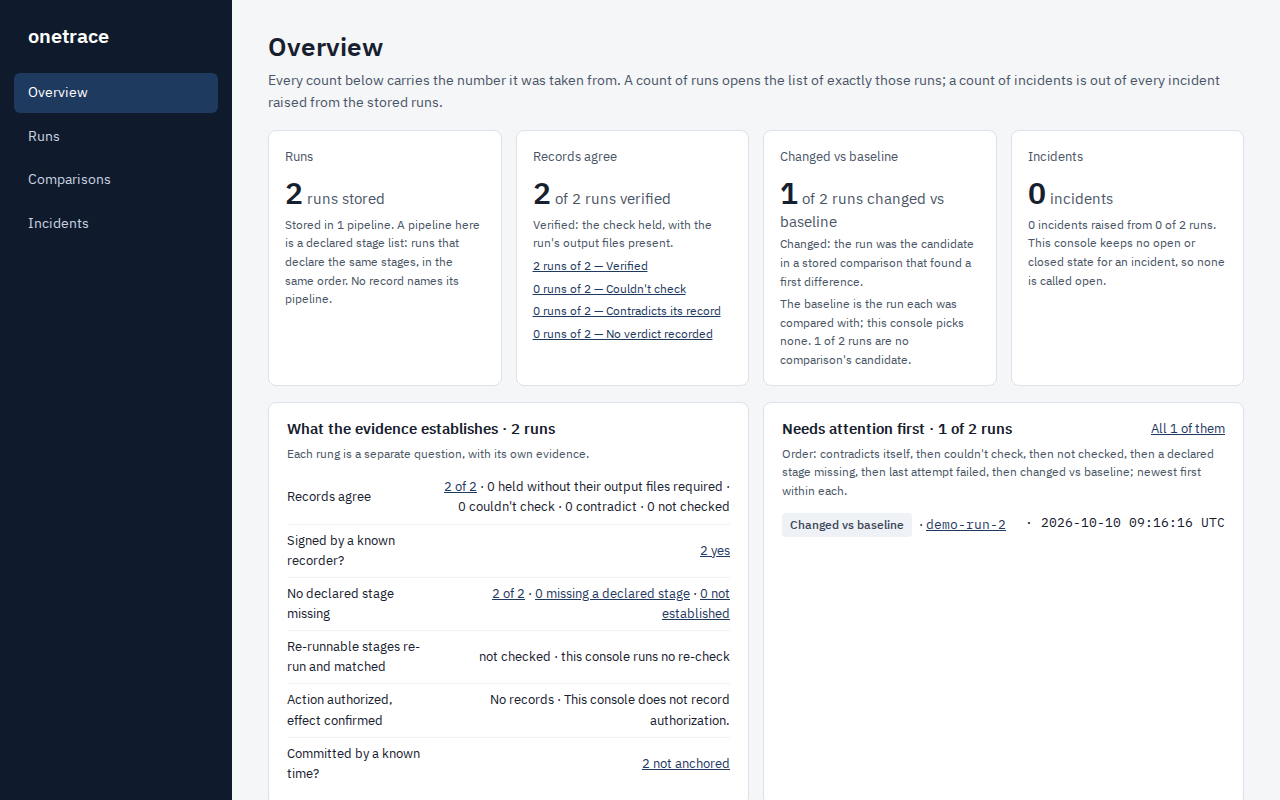
Every run, and what the evidence says about it
Counts you can click through to the exact runs behind them. Which runs verified, which changed against their baseline, and which need attention first.
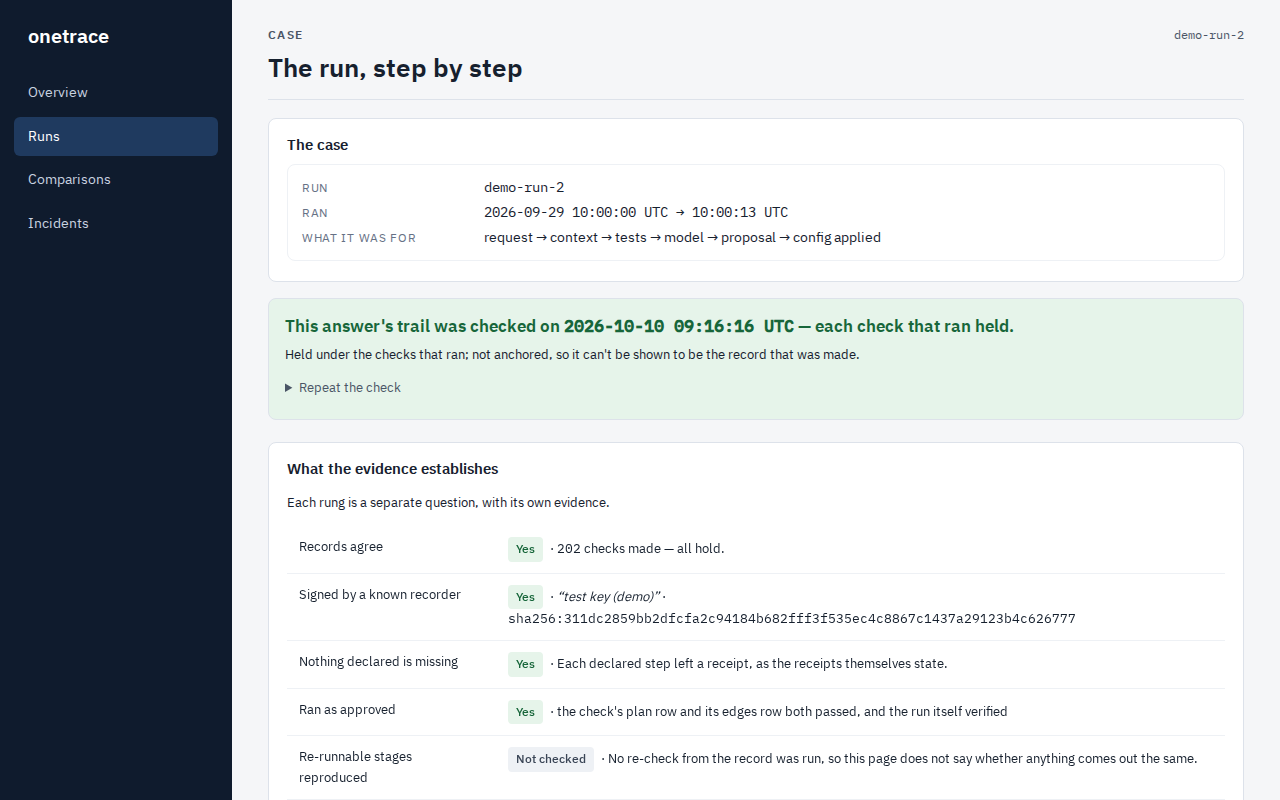
A run, step by step, with its checks
A clear verdict at the top, then one question at a time: do the records agree, was it signed, is any step missing. Each answer says exactly what was and wasn't checked.
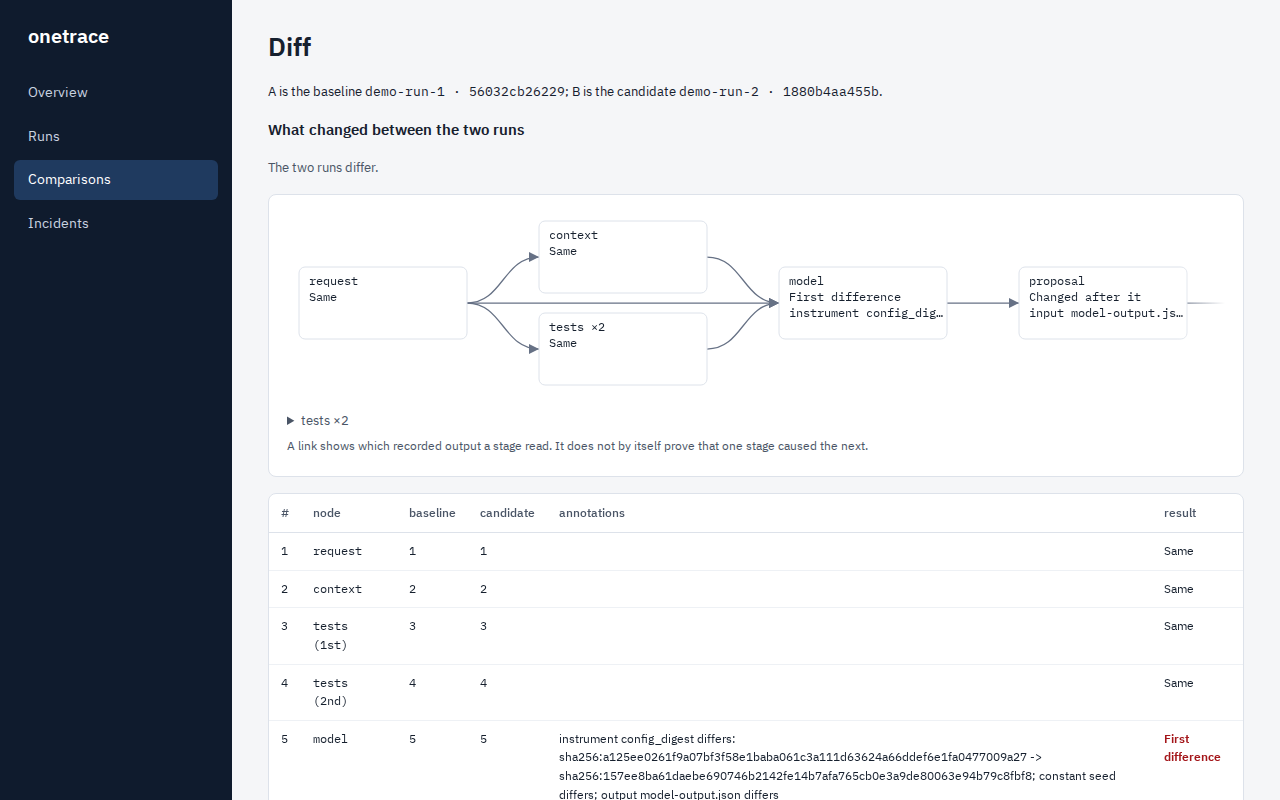
Where two runs part ways, and the text that changed
The graph marks the first step that differs and everything downstream of it. Below, the actual output text that changed, side by side.
Auditable and governable
From evidence to a decision you can defend.
Every agentic run leaves a record an auditor can check on their own. Every change can be held against an approved baseline before it ships, with the step that changed named for the reviewer.
1 · Run
Your pipeline or agent runs. Every step writes a receipt.
2 · Verify
onetrace-verify checks the record offline, trusting none of your code.
3 · Compare
onetrace diff against the approved baseline: one verdict per step.
Who it's for
Built for the people who get asked "why?"
Ship changes with confidence
Upgrade a model, a retriever or a prompt, then compare before and after, step by step.
From "something changed" to "this step changed" in one command.
Hand over a record, not a story
Give reviewers the run folder. They check it themselves, offline, with a verifier that doesn't trust your code.
Evidence a third party can verify on their own.
Add it in minutes, remove it in seconds
Two decorators on the code you already have. Plain Python, LangChain, LlamaIndex and Langflow examples included.
No platform, no account, no data leaves your machine.
Honest by design
We tell you what it doesn't prove, too.
A record you can trust has to be clear about its limits. onetrace says these out loud, in the product and in the docs.
It doesn't judge truth
A pipeline that faithfully records a wrong answer still verifies. onetrace shows what ran, not whether the answer was right.
"Same" means same output
A step marked same produced identical output. If its tool or settings changed, that's flagged separately, never hidden.
Not checked is not passed
When something couldn't be checked, onetrace says so plainly. It never reports a gap as a pass.
Go deeper
Pick your level of detail.
The same product, explained three ways. Each page stands on the one after it.
What it does for you
The problem, the value and the product. You're here.
This page For developersAdd it and run it
Install, add two decorators, run, verify, compare, and open the console on your own runs.
Developer guide → For researchers and reviewersHow it works underneath
Receipts, the hash chain, the verifier, the five comparison verdicts and the published format.
The mechanism →See it on real runs in one click.
The live demo is the real console, read-only. Or install it and point it at your own pipeline.