Put one door between your agent and its tools.
Install from PyPI, copy a policy, start the decision service, and every action goes decide, act, report. Everything below was run against onedoor 0.8.1 as published; the outputs are what it printed.
1 · Quickstart
Four commands, from PyPI.
Python 3.12 or later. Nothing here needs the source repository. Step 2 copies the shipped payments examples: worked examples of the policy vocabulary, not a compliance artifact (read PACK.md beside the file in the installed package).
First, a fresh virtual environment, so nothing goes into your system Python (recommended):
python -m venv .venv
source .venv/bin/activate        # Windows PowerShell: .venv\Scripts\Activate.ps1
Then the four commands. In the first, [service] is the name of one of onedoor's optional extras: it adds what the HTTP decision service needs. Type it as shown, quotes included. Other extras work the same way, for example onedoor[studio].
pip install "onedoor[service]"
python -c "import shutil; from onedoor import templates; shutil.copy(templates.PAYMENTS.policies_path, 'policies.yaml')"
export ONEDOOR_DECIDE_KEYS=dev ONEDOOR_ADMIN_KEYS=root ONEDOOR_DB=onedoor.db ONEDOOR_POLICIES=policies.yaml
python -m uvicorn onedoor.service.app:create_app --factory --host 127.0.0.1 --port 8099
On Windows PowerShell, the third line is $env:ONEDOOR_DECIDE_KEYS="dev"; $env:ONEDOOR_ADMIN_KEYS="root"; $env:ONEDOOR_DB="onedoor.db"; $env:ONEDOOR_POLICIES="policies.yaml". dev and root are local example keys; choose your own anywhere else.
Then, in another terminal, three requests:
curl -s localhost:8099/v1/health
curl -s -X POST localhost:8099/v1/decide -H "Authorization: Bearer dev" -H "Content-Type: application/json" \
  -d '{"request_id":"11111111-1111-1111-1111-111111111111","action_type":"payments.transfer","params":{"amount_eur":120.00,"destination_account":"acct-1"},"source":"llm","rationale":"pay supplier invoice"}'
curl -s -X POST localhost:8099/v1/decide -H "Authorization: Bearer dev" -H "Content-Type: application/json" \
  -d '{"request_id":"22222222-2222-2222-2222-222222222222","action_type":"wire.anywhere","params":{},"source":"llm","rationale":"move funds"}'
{"status":"ok","kill_switch":false,"pending_intents":0}
{"decision":"permitted","reason":"passed","detail":null,"effective_tier":2,...,"intent_audit_id":1,...}
{"decision":"denied","reason":"default_deny","detail":"action type 'wire.anywhere' is declared by no policy, so it is refused; declare it in the policy set (at tier 3 to require a human's approval) to allow it",...}
The first decision is a permit: capped, reversible, and you now owe a report. The second is default-deny, with the refusal saying what would allow it. Amounts in params may be JSON numbers (120.00) or decimal strings ("120.00").
On Windows PowerShell 5.1, a JSON body with a space in it is split before curl sees it. Use curl.exe with --%, escape the inner quotes, and put each command alone on its line, for example:
curl.exe --% -s -X POST localhost:8099/v1/decide -H "Authorization: Bearer dev" -H "Content-Type: application/json" -d "{\"request_id\":\"11111111-1111-1111-1111-111111111111\",\"action_type\":\"payments.transfer\",\"params\":{\"amount_eur\":120.00,\"destination_account\":\"acct-1\"},\"source\":\"llm\",\"rationale\":\"pay supplier invoice\"}"
2 · A policy
Policies are data, not code.
One entry per action type: its tier, bounds, caps, effects, how to undo it, and whether it rehearses first. Changing what is allowed never means changing the engine. This is the transfer rule from the shipped examples.
policies:
  - action_type: payments.transfer
    tier: 2                              # runs without asking, up to its caps
    dry_run: false
    compensating_command: payments.reverse   # no undo, no auto-execution
    cost_param: amount_eur
    undo_window_seconds: 900
    caps:
      eur_day: 500.00
      eur_month: 5000.00
    effects: [money.egress]              # shares a budget and tier floor with every action with this effect
    bounds:
      required: [amount_eur, destination_account]
      strict_params: true                # any other parameter is refused
      numeric:
        amount_eur: { min: 0.01, max: 2000.00 }
The loader refuses to start on a bad policy
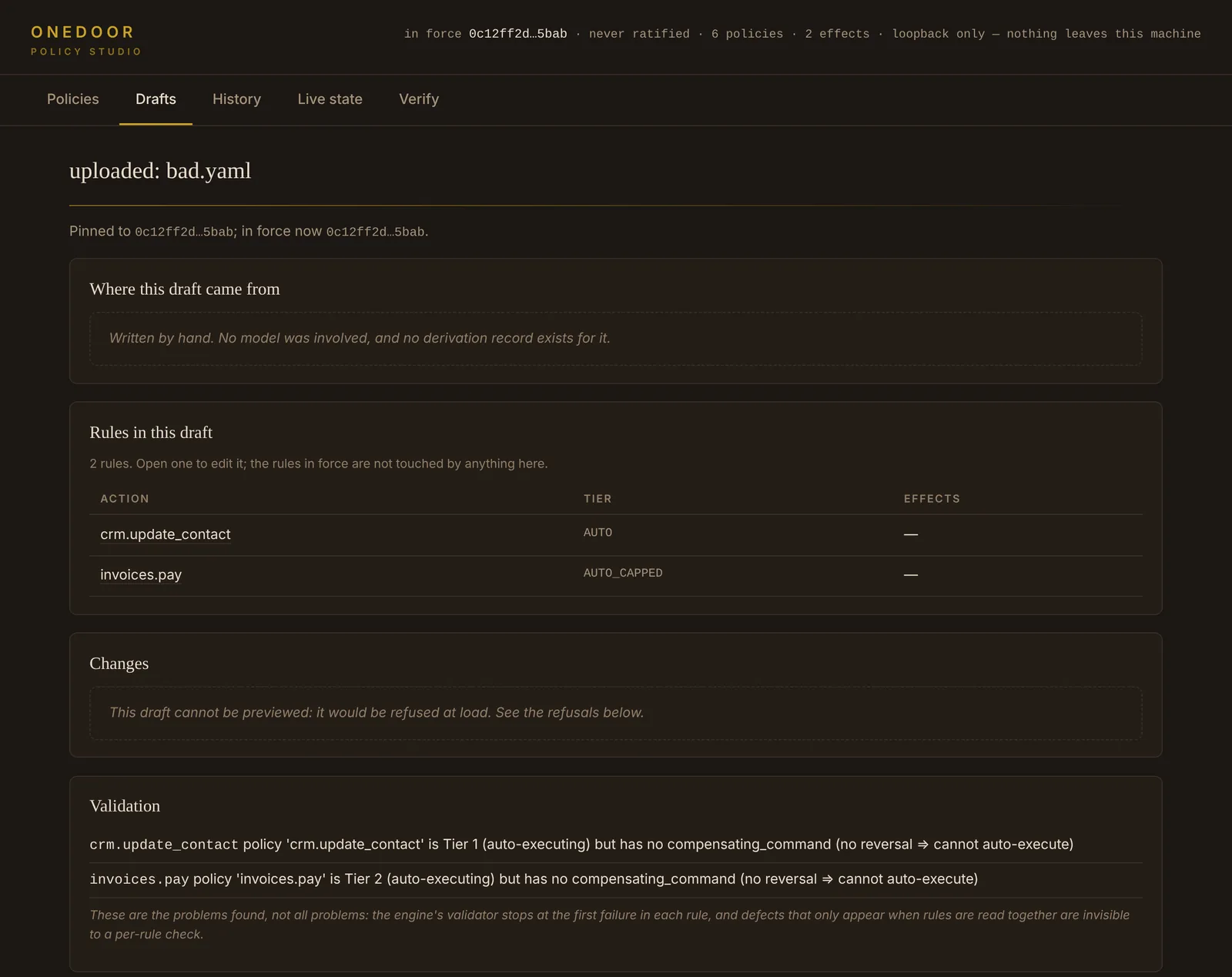
An auto-running tier with no compensating_command, or a cost_param that is not required, stops the service at start-up rather than at the first request.
Effects, not just names
The same real-world effect through differently named tools shares one budget and one tier floor. Declare effects: [money.egress], and add param_effects rules for generic tools.
3 · Decide, act, report
Ask first. Act only on a permit. Then say what happened.
A permitted decision carries an intent_audit_id: an obligation. Do the action, then report its outcome against that id. The report is what settles or releases the reserved budget.
decision | What your code does |
|---|---|
permitted | Act, then POST /v1/report with the intent_audit_id and an outcome. |
proposed | Don't act. It waits for a person; the response carries an approval_id. |
denied | Don't act. reason names the check that refused it: default_deny, bounds, budget_exhausted, kill_switch, and others. |
executed | Observe-tier actions (reads) are recorded and need no report. |
curl -s -X POST localhost:8099/v1/report -H "Authorization: Bearer dev" -H "Content-Type: application/json" \
  -d '{"intent_audit_id":1,"outcome":"success","payload":{"transfer_id":"tx-1001"}}'
outcome | Budget |
|---|---|
success | Settled: the action happened. |
failure | Settled: it was attempted. With "no_effect": true (you know nothing happened), released instead, as an audited event. |
timeout | Settled: it may have happened, so onedoor assumes it did. |
not_attempted | Released, as an audited event: you assert it did not happen. A calls-per-day count is never given back, whatever the outcome. |
When a cap runs out, the denial says which counter and how much is left. From the same run, after a €120 transfer, a request for €400:
{"decision":"denied","reason":"budget_exhausted","detail":"€/day cap 500 reached",...,
 "budget":{"name":"payments.transfer.eur_day","dimension":"EUR","limit":"500","remaining":"380","window":"day","consumed":"120",...}}
4 · Approvals and the kill switch
Operator acts live behind a different key.
Listing, approving, granting and denying approvals, and the kill switch, need an admin key (ONEDOOR_ADMIN_KEYS). Decide keys cannot reach them.
curl -s localhost:8099/v1/approvals -H "Authorization: Bearer root"
curl -s -X POST localhost:8099/v1/approvals/1/approve -H "Authorization: Bearer root"   # either: approve and resume
curl -s -X POST localhost:8099/v1/approvals/1/grant   -H "Authorization: Bearer root"   # or: approve only; the proposer resumes later by reference
curl -s -X POST localhost:8099/v1/approvals/1/deny    -H "Authorization: Bearer root"   # or: deny
curl -s -X POST localhost:8099/v1/killswitch -H "Authorization: Bearer root" -H "Content-Type: application/json" -d '{"engaged":true}'
With the switch engaged, the same €40 transfer that was permitted a moment earlier:
{"decision":"denied","reason":"kill_switch","detail":"kill switch engaged; not proposed",...}
Releasing it reports whether the policy version changed while the door was shut (policy_change_while_engaged). Approve, grant and deny are alternatives: once one has acted, the others answer "not pending". In the shipped examples, payouts.schedule sets no dry_run: false, so approving it runs a rehearsal ("would have executed"), not a payout. A person cannot approve their own proposal, and an approval presented by reference can be used only by the caller that proposed the action. Set ONEDOOR_APPROVAL_WEBHOOK to send tier-3 proposals to a Slack-compatible webhook.
5 · The Studio
Write, check and ratify policy in a browser, on your machine.
pip install "onedoor[studio]"
python -m onedoor.studio --db onedoor.db --studio-db studio.db
# then open http://127.0.0.1:8787
--db must name the same file the decision service uses: their defaults differ, and two different files give you a Studio that works and shows an empty world. --studio-db holds your drafts and stays separate. The Studio binds to loopback only and refuses any other address before it opens a socket.
Three ways to write
The guided editor, an uploaded YAML file, or the REST API (/api/v1/drafts, schema at /api/v1/openapi.json). The v1 API can draft and submit, and has no approval route; one older route that still ratifies over HTTP is being retired.
Two lists, never merged
"The loader would refuse this" is what fails at start-up. "Once in force, these rules will…" is how a loadable rule behaves at decision time, with the reason code it will record.
Drafts from a model, if you want
Off by default and absent when off. Point it at your own endpoint and a description becomes a draft that goes through the same loader and the same ratification as anything you type.
6 · With onetrace (optional)
Each gated step cites the decision that allowed it.
Set ONEDOOR_ISSUER to a name for your deployment and each decision that permits, denies or proposes carries a decision_ref (dry-runs and tier-0 reads carry none). Pass it to ot.decision() inside a step you declared as gated. Requires onetrace 0.5.0 or later; this was run with 0.6.0.
export ONEDOOR_ISSUER=https://payments.example/onedoor # before starting the service
import json, uuid, urllib.request
import onetrace as ot

ONEDOOR = "http://127.0.0.1:8099"

def call(path, body):
    req = urllib.request.Request(ONEDOOR + path, data=json.dumps(body).encode(),
        headers={"Authorization": "Bearer dev", "Content-Type": "application/json"})
    with urllib.request.urlopen(req) as r:
        return json.load(r)

@ot.stage("approve_payment", instrument=ot.pkg("pay-invoice", "onetrace", kind="tool"))
def approve_payment(invoice, amount_eur):
    answer = call("/v1/decide", {"request_id": str(uuid.uuid4()), "action_type": "payments.transfer",
        "params": {"amount_eur": amount_eur, "destination_account": "acct-1"},
        "source": "llm", "rationale": f"pay {invoice}"})
    ot.decision(answer["decision_ref"])          # recorded in this step's receipt
    if answer["decision"] != "permitted":
        raise RuntimeError(f"onedoor said {answer['decision']}: {answer['reason']}")
    # ... move the money here ...
    call("/v1/report", {"intent_audit_id": answer["intent_audit_id"], "outcome": "success"})
    return {"paid": invoice}

@ot.run(stages=["approve_payment"], gated_stages=["approve_payment"])
def main(invoice, amount_eur):
    print(approve_payment(invoice, amount_eur))

if __name__ == "__main__":
    main("INV-0001", 40.00)
Run it, export onedoor's ledger, and verify the run against the export:
python pay.py
python -m onedoor.export --store onedoor.db --out decisions.jsonl     # writes decisions.jsonl.sha256 beside it
onetrace-verify --require-artifacts --decisions decisions.jsonl runs/<run id>
[PASS   ] decisions: gated steps cite a decision -- 1 gated step(s), each citing a decision
[PASS   ] decisions: references are well formed -- 1 reference(s), each a well-formed onedoor-decision-ref/1
[PASS   ] decisions: a step that acted cites a permitting decision -- 1 acting step(s), each citing a permitting decision
[NOT-RUN] decisions: the permit covers the recorded action -- no permit recorded
[PASS   ] decisions: the decision is in the export -- 1 reference(s), each matching a row in the export by digest

59 pass, 0 fail, 3 not-run  ->  PASS
A step that acts on a deny, or a gated step that cites nothing, fails its row by name. A reference can also be checked on its own, with onedoor alone: python -m onedoor.decision_ref check --export decisions.jsonl --ref ref.json answers matches, digest mismatch, not in export, malformed ref or export damaged, each with its own exit code.
7 · Records and receipts
Read the ledger without trusting the process that wrote it.
python -m onedoor.export --store onedoor.db --out decisions.jsonl          # one JSON object per line, read-only
python -m onedoor.viewer --store onedoor.db --out oneview.html             # a static receipt page for a real store
python -m onedoor.viewer --demo-store demo.db --out oneview.html           # or a labelled sample, built by the real engine
pip install "onedoor[signed]"                                              # Ed25519 signatures over each row, off until you turn them on
Signing that refuses to pretend
Configure signing without the library installed and the process refuses to start. The private key is yours and never enters the store or a receipt; rotation keeps old keys, so old receipts verify forever.
Anchoring, wherever you like
Merkle roots over ranges of rows, published where you choose. Someone holding a published root and one exported receipt can check membership with nothing else from onedoor.
8 · Other surfaces
The same checks, wherever your agent calls tools.
| Surface | Install | Guide |
|---|---|---|
| HTTP decision service | onedoor[service] | integration-service.md |
| Python library (decide and reserve, then report) | onedoor | integration-library.md |
| MCP proxy (stdio, both sides) | onedoor | integration-mcp.md |
| LangChain / LangGraph middleware | onedoor[langchain] | integration-langgraph.md |
LiteLLM guardrail (experimental example, in the repository's examples/, not in the package) | onedoor[litellm] for its dependencies | integration-litellm.md |
| OpenTelemetry spans and counters | onedoor[otel] | No code changes once installed. |
| The full policy reference | policy-reference.md |
Next: how it works, the check order and what each record proves.